SquadSync — a workforce management platform operated by Lay Group Labs LLC (DBA LayerCraft)
This page documents exactly how employees provide express written consent (opt in) to receive SMS notifications from SquadSync, and how they can get help or opt out at any time. It is provided as public proof of our Call-to-Action and consent flow.
How to Opt In
SMS notifications are available only to employees of businesses that use SquadSync. The employee provides their own mobile phone number in the app and then explicitly enables SMS; consent is collected inside the product through the following explicit, self-initiated steps:
Step 1 — The employee enters their mobile phone number
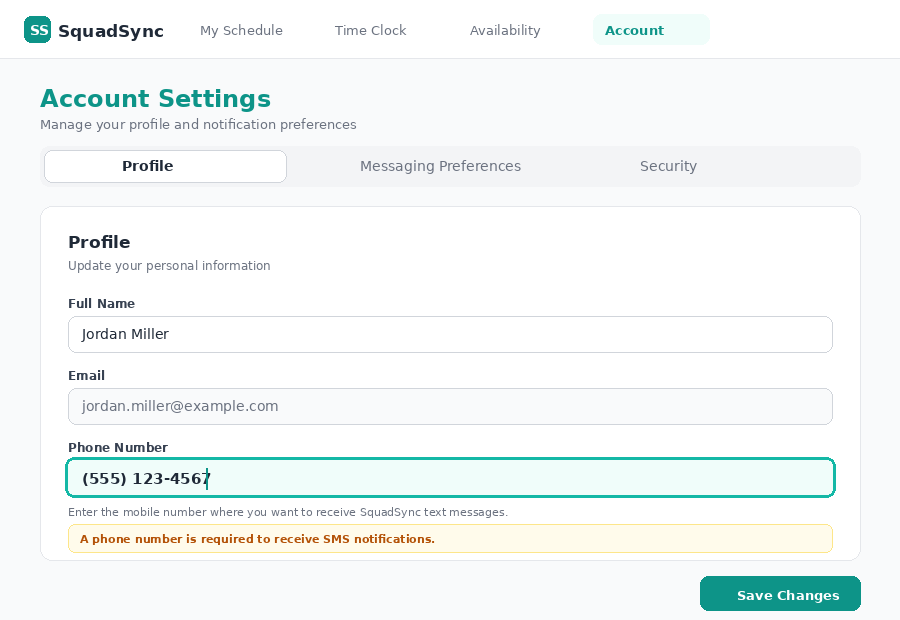
The employee signs in to their SquadSync account and opens Account → Profile, where they type their own mobile phone number into the "Phone Number" field and tap Save Changes. This is the number that SMS messages will be sent to. (A manager or administrator may enter it on the employee's behalf during onboarding; the employee must still complete Steps 2–4 themselves to consent.) See screenshot 1 below.
Step 2 — Open Messaging Preferences
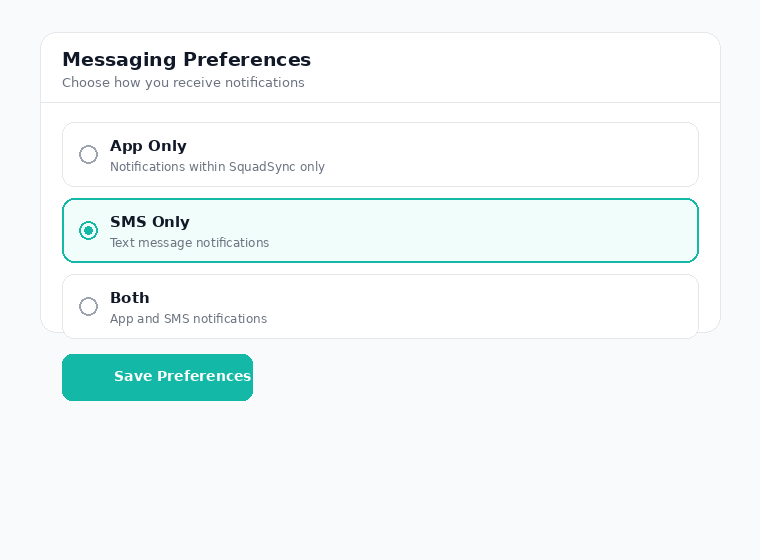
The employee opens Account → Messaging Preferences in the SquadSync app.
Step 3 — Select an SMS option to reveal the consent disclosure
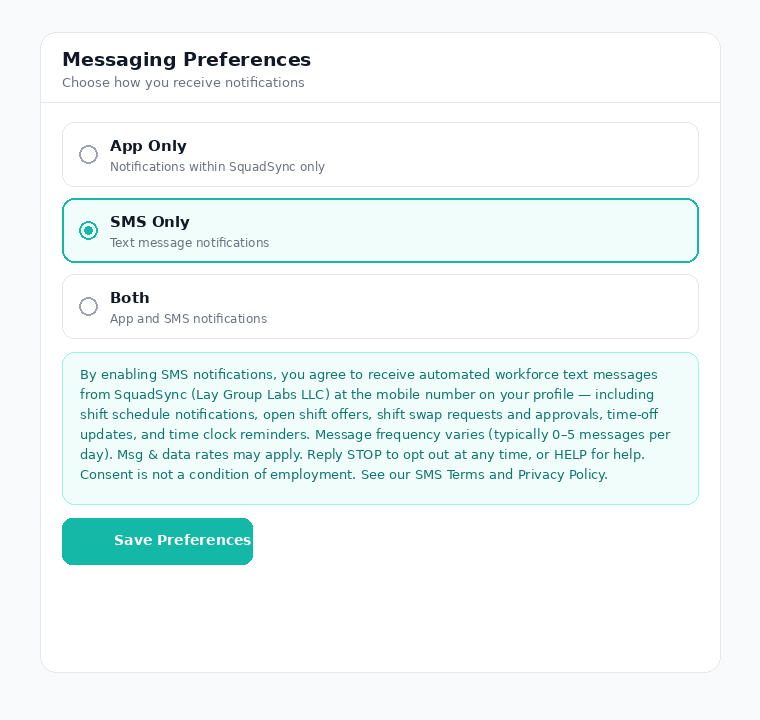
The employee selects "SMS Only" or "Both". At that moment, the following consent disclosure is displayed on screen directly above the save button:
Consent disclosure shown in-app
By enabling SMS notifications, you agree to receive automated workforce text messages from SquadSync (Lay Group Labs LLC) at the mobile number on your profile — including shift schedule notifications, open shift offers, shift swap requests and approvals, time-off updates, and time clock reminders. Message frequency varies (typically 0–5 messages per day). Msg & data rates may apply. Reply STOP to opt out at any time, or HELP for help. Consent is not a condition of employment. See our SMS Terms and Privacy Policy.
Step 4 — Save Preferences to record consent
The employee taps "Save Preferences," which records their express consent to receive SMS messages at the number on their profile.
Step 5 — Opt-in confirmation text
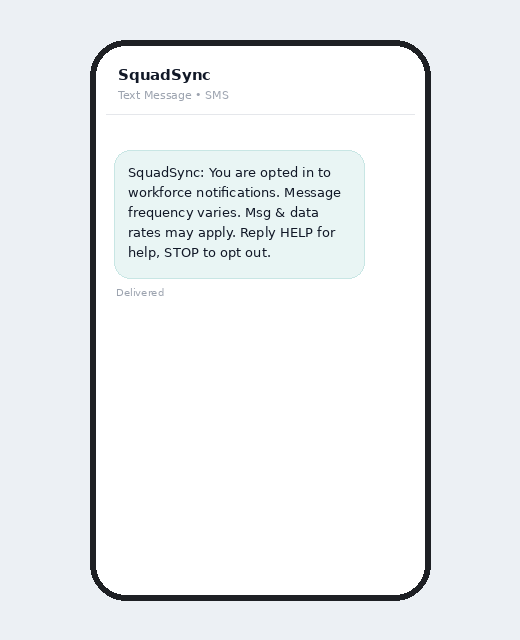
The employee receives the opt-in confirmation text message:
"SquadSync: You are opted in to workforce notifications. Message frequency varies. Msg & data rates may apply. Reply HELP for help, STOP to opt out."
Screenshots of the Opt-In Screen
The images below show the actual in-product opt-in flow described above, in order: the employee enters their phone number, selects a messaging preference, sees the consent disclosure, and receives the confirmation text.
Screenshot 1 — Phone number entry. The employee types their mobile number into the "Phone Number" field on Account → Profile. This is where the number that receives SMS is provided.Screenshot 2 — Messaging preference selection (App Only / SMS Only / Both).Screenshot 3 — Consent disclosure shown after choosing an SMS option, directly above Save Preferences.Screenshot 4 — Opt-in confirmation text received at the number entered in Screenshot 1.
Consent is optional and is not a condition of employment. All SquadSync features remain fully available in the web and mobile app without enabling SMS.
Types of Messages
Employees who opt in may receive the following types of SMS notifications:
Shift Schedule Notifications: Notices about upcoming shifts and schedule changes.
Open Shift Offers: Alerts when a shift is available to claim.
Shift Swap Requests & Approvals: Requests to swap or cover shifts, and approval/denial updates.
Time-Off Updates: Status updates on time-off requests.
Time Clock Reminders: Reminders related to clocking in or out for a scheduled shift.
Message Frequency
Message frequency varies based on your schedule and workplace activity — typically 0–5 messages per day.
Opt-In Confirmation
When SMS notifications are first activated for your phone number, you will receive a confirmation message:
"SquadSync: You are opted in to workforce notifications. Message frequency varies. Msg & data rates may apply. Reply HELP for help, STOP to opt out."
By providing your phone number and enabling SMS notifications in SquadSync, you expressly consent to receive automated workforce notification messages from Lay Group Labs LLC. You may revoke this consent at any time by replying STOP.
How to Opt Out
You can stop receiving SMS notifications at any time by:
Replying STOP to any message you receive from us.
Disabling SMS notifications in your SquadSync account settings (Account → Messaging Preferences).
Additional opt-out keywords: CANCEL, END, QUIT, UNSUBSCRIBE, REVOKE, STOPALL. After opting out, you will receive a final confirmation message and no further messages will be sent.
Message and data rates may apply. Check with your wireless carrier for details about your messaging plan. Carriers are not liable for delayed or undelivered messages. Compatible with all major US wireless carriers.
Consent Is Not a Condition of Employment
Enabling SMS notifications is entirely optional. Consent to receive text messages is never required as a condition of employment, and all SquadSync features remain available in the web and mobile app whether or not SMS is enabled.